


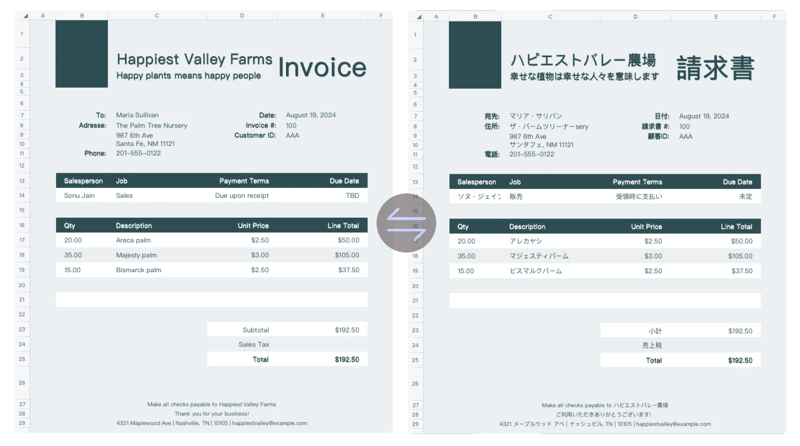
Translation Demo from Transmonkey Excel Translator
"As a project manager dealing with multilingual teams, Transmonkey's Excel translator is invaluable. It preserves formatting perfectly, which is crucial for our data visualization sheets."

"I was skeptical about AI translations at first, but Transmonkey's Excel translator exceeded my expectations. It handled our product inventory sheets with ease, maintaining all formulas and conditional formatting."

Fast, high-quality AI Excel Translation
Transmonkey's AI Excel translator can translate entire Excel files up to 500MB instantly, preserving formatting and formulas intact. Leveraging advanced AI models, our solution delivers accurate results across 130+ languages.
Experience the best AI Excel translator with Transmonkey—the fast, reliable way to translate Excel files up to 500MB while preserving formulas.

Why Choose Transmonkey AI Excel Translator?

Full-Document Translation
Our AI Excel translator lets you translate text in Excel files without the hassle of manually copying and pasting into specific columns. Translate the entire file with just one click.

Keep Formatting & Formulas
With our AI Excel translator, your file’s structure—charts, tables, formulas or text—stays perfectly intact. The translated file will be an accurate reflection of the original.

130+ Extensive Language
Our Excel translator supports over 130 languages, allowing you to effortlessly connect and communicate across the global market.

Accuracy Powered by LLM
Powered by cutting-edge large language models like ChatGPT, Gemini, and Claude, our AI system ensures your translations are both accurate and natural in every language.

Strictest Data Security
Security is paramount when translating in Excel. Transmonkey adheres to the strictest data protection standards, ensuring your sensitive information remains confidential.

Instant Translation Result
Translate Excel files in seconds with our online Excel translator and receive instant results. In the blink of an eye, all work will be done.
Every translation tool you need, all in one place


3 Quick Steps to Translate Excel Documents Online

Upload Your Excel Document
Drag your Excel file into the upload window, or click the "Select File to Upload" option to add your document to the translator.
Select Language
Choose the original language and the target language in the language selection dropdown menu at the top of the translator.
Download Translated Document
Click "Translate" and wait for the translation to finish. Download the translated document once the process is complete.
Explore More TransMonkey AI Translation Tools
Frequently Asked Questions
Still have questions? Contact us
Transmonkey aims to transform the way the world communicates by eliminating language barriers with our state-of-the-art translation tools. Powered by advanced AI models like ChatGPT and Gemini, our platform seamlessly translates various document formats into over 130 languages.
Free users can process about 3000 words using our AI Excel translator. For subscribed users, the limit depends on the chosen plan, with the maximum file size being 500 MB.
Large language models are generally slower than traditional machine translation. Depending on the amount of text in your document, the translation may take anywhere from a few seconds to around ten minutes.
Yes, our AI Excel translator smartly extracts, translates, and reinserts the translated text precisely in its original position, ensuring the document's layout remains intact.
Transmonkey Excel translator is compatible with all major Excel formats including .xlsx, .csv, .xml, .xlf and .xliff.
Transmonkey provides free trial credits for free accounts. To obtain more credits, you can subscribe to our premium service.
Yes. Your data is securely stored on highly protected, dedicated servers located in the United States. Our storage partners are continuously audited and adhere to strict data security and privacy compliance standards.You can request immediate data deletion anytime at service@imgkits.com.
Data security is our highest priority at Transmonkey. We implement robust security measures for our Excel translator, such as end-to-end encryption and tight access controls, to protect all documents, with special attention to the confidentiality of Excel files.
We offer refund options for both subscription plans and pay-as-you-go credits. Our refund policy varies by subscription type and purchase timing. For complete details about eligibility, refund windows, and how to request a refund, please visit our dedicated refund policy page at https://www.transmonkey.ai/cancel-and-refund. You can also contact our support team at vote@imgkits.com for refund assistance.